
TL;DR
A Rain Bird rain sensor automatically shuts off your sprinkler system when it rains, saving 15 to 35 percent on irrigation water annually. Installation typically takes under an hour and involves mounting the sensor outdoors, wiring (or wirelessly pairing) it to your irrigation controller, and configuring rainfall and freeze set points for your climate. Texas law requires a rain sensor or equivalent shutoff device on all new irrigation systems and whenever a controller is replaced, so this isn’t optional for most Lubbock homeowners.
What Is a Rain Bird Rain Sensor (and Why Pros Call It a “Rain Switch”)?
A Rain Bird rain sensor is a device that interrupts your sprinkler system’s watering cycle when enough rain has fallen. It sounds high-tech, but the mechanism is surprisingly simple. Inside the housing sits a stack of porous cork discs that absorb water and expand. When they expand enough, they push down on a spring-loaded switch that breaks the electrical circuit to your irrigation valves. When the discs dry out, they shrink, the spring closes the switch, and your controller resumes its normal schedule.
Practitioners in the irrigation field point out that the word “sensor” is actually misleading. One practitioner blog notes that sticklers for accuracy call it a “rain switch” because it’s a mechanical device that opens and closes a circuit, not an electronic sensor in the traditional sense. Understanding this distinction helps when you’re troubleshooting. You’re not dealing with software or circuitry. You’re dealing with cork, a spring, and a simple switch.
Rain Bird makes two main product lines for residential and commercial use: the RSD Series (wired) and the WR2 Series (wireless). Both accomplish the same goal, but they differ in features, price, and installation complexity.
Why You Should Install a Rain Bird Rain Sensor
Water and Money Savings
Studies from the University of Florida IFAS Extension have shown that a properly calibrated rain sensor can reduce irrigation water use by 15 to 35 percent annually. In a semi-arid climate like Lubbock’s, where water rates climb and conservation matters, that percentage translates to real dollars on your monthly bill.
Preventing Landscape Damage
Overwatering causes more lawn problems than most homeowners realize. Fungal disease, shallow root systems, and waterlogged soil all stem from irrigating when the ground is already saturated. A rain sensor prevents your system from piling water on top of water.
Texas Law Requires It
This is the big one for Lubbock and West Texas homeowners. The Texas Commission on Environmental Quality (TCEQ) made it mandatory in 2009 that every new lawn sprinkler system, and any repair involving a new controller, must include a rain sensor or equivalent technology that automatically shuts off irrigation during rainfall. If you’re replacing your controller or having a new irrigation system installed in Lubbock, a rain sensor isn’t optional. It’s required for compliance.
Some Texas municipalities go further and require freeze sensors as well. The WR2 series covers both rain and freeze sensing in one device.
Rain Bird Sensor Models Explained
Before learning how to install a Rain Bird rain sensor, you need to pick the right model. Here’s how the three main options compare:
RSD Series (Wired)
The Rain Bird RSD is the workhorse of the product line. It costs around $34.49 for the RSDBEX model with mounting bracket. It connects directly to your controller via wire, which means no batteries and no wireless signal to worry about. It offers adjustable rainfall settings from 1/8 inch to 3/4 inch. The tradeoff is that you need to run wire from the sensor’s outdoor mounting location back to the controller, which can be a hassle on existing homes where the controller is inside a garage.
Irrigation professionals on LawnSite.com report that they prefer the wired Rain Bird rain switch for reliability and default to the WR2 only when running wire is impractical.
WR2 Series (Wireless Rain/Freeze)
The WR2 retails for about $116.99 and adds wireless transmission (up to 700 feet line of sight), a freeze shutoff function with adjustable temperature thresholds from 33°F to 41°F, and an LCD display on the controller interface. It runs on a battery with a four-plus year lifespan under normal conditions. It adjusts from 1/8 inch to 1/2 inch of rainfall.
One important note: the WR2 is not compatible with Rain Bird’s ESP-SMT, ESP-SMTe, SST600s, or SST1200s smart controllers. Check your controller model before purchasing.
WR2-48 (Wireless with 48-Hour Delay)
The WR2-48 adds an automatic 48-hour irrigation hold after adequate rainfall ends. The key distinction that practitioners highlight: the WR2-48 starts the 48-hour clock when rain ends, not when it starts. This matters because it gives soil time to absorb the water that fell, rather than starting a countdown the moment the first drops hit the sensor.
Key Terms You’ll Encounter
If you’re figuring out how to install a Rain Bird rain sensor for the first time, a few technical terms will come up repeatedly. Here’s what they mean in plain language:
Hygroscopic Discs
The stack of porous cork or cellulose discs inside the sensor housing. They absorb water and expand, which triggers the shutoff switch. When they dry out, they shrink and allow irrigation to resume. These discs wear out over time and can be replaced without buying a whole new sensor.
SENS Terminals
The two terminals on your Rain Bird controller labeled “SENS” (or sometimes “Sensor”). This is where the sensor wires connect. On a factory-fresh controller, these terminals are bridged by a small yellow jumper wire that completes the circuit. You must remove this jumper before connecting a rain sensor.
Jumper Wire
The factory-installed wire bridging the SENS terminals. If your sprinklers run fine without a sensor, it’s because this jumper is completing the circuit. Removing it and wiring in a sensor puts the rain switch in line with that circuit.
Normally Open / Normally Closed
Describes the default state of the sensor’s switch. Rain Bird sensors are typically “normally closed,” meaning the circuit is complete (irrigation can run) until the sensor detects enough rain and opens the circuit (stopping irrigation). Your controller documentation will specify which configuration it expects.
Rainfall Set Point
The adjustable threshold at which the sensor interrupts irrigation. Setting it to 1/4 inch means the sensor will trip after a quarter inch of rainfall has slowly accumulated on the discs.
Freeze Set Point
Available on WR2 models. The temperature at which the sensor shuts off irrigation to prevent ice formation on walkways, driveways, and plant surfaces. Default is 37°F out of the box.
Sensor Bypass
A switch or setting on your controller that temporarily ignores the rain sensor. Useful when you need to run a manual test cycle or perform sprinkler system repairs even though the sensor is active.
Quick Shut Off
A WR2 feature that interrupts irrigation immediately when rain starts, before the discs have fully expanded. This prevents wasted water during the early minutes of a rain event.
Step-by-Step: How to Install a Rain Bird Rain Sensor (Wireless WR2)
Rain Bird designed the WR2 so that one person can install it in under an hour. Here’s the process at a high level. Always follow your specific model’s installation manual for detailed instructions.
Step 1: Gather Your Tools
You’ll need a drill with an appropriate bit, a Phillips screwdriver, and the WR2 package (which includes the outdoor sensor, indoor controller interface, mounting hardware, and battery).
Step 2: Choose the Sensor Location
This is the most important decision in the entire installation. The outdoor sensor needs to be:
- High enough that it won’t receive spray from your sprinkler heads
- Unobstructed by trees, roof overhangs, or awnings that would block rainfall from reaching the discs
- Within 700 feet of the controller (line of sight), though real-world range is often shorter
Good mounting spots include the top of a fence, the eave of your house, or a gutter edge. The mounting bracket attaches to any vertical surface or clips onto a standard gutter.
Step 3: Disconnect Controller Power
Turn off power to your irrigation controller before touching any wiring. This protects both you and the controller.
Step 4: Mount the Controller Interface
The indoor receiver (controller interface) mounts near your irrigation controller. It needs to be close enough to wire into the controller’s SENS terminals.
Step 5: Wire the Interface to the Controller
Connect the power wires (red and black) to a 24VAC power source on the controller. Connect the sensor wires to the SENS terminals. Before connecting, remove the yellow jumper wire that bridges those terminals. Keep the jumper in a safe place in case you ever need to bypass the sensor temporarily.
Step 6: Reconnect Power
Turn the controller back on.
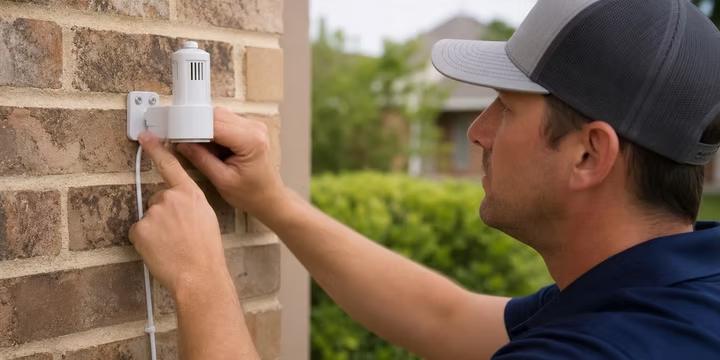
Step 7: Mount the Outdoor Sensor
Attach the sensor to your chosen outdoor location using the included bracket and hardware.
Step 8: Insert Battery and Pair
Hold down the arrow buttons on the controller interface until the pairing indicator starts flashing, then insert the battery into the outdoor sensor. The two units will sync automatically. The LCD on the interface will confirm the connection and display signal strength.
Step 9: Verify Signal Strength
Check the interface’s LCD. If signal strength is weak, consider relocating the sensor closer or reducing obstructions. Practitioners on LawnSite.com report that WiFi routers operating at 900 MHz can interfere with the WR2’s signal, and real-world range often drops below 300 feet in homes with stucco, brick, or metal siding.
Step 10: Configure Your Set Points
Adjust the rainfall threshold and (if applicable) the freeze temperature threshold. We’ll cover the best settings for West Texas in the next section.
Step 11: Test the System
Run a manual watering cycle. Then manually trip the sensor (most models have a test button or you can press down on the spindle) and confirm the controller halts irrigation.
If any step involves wiring you’re not comfortable with or a controller model you’re unfamiliar with, that’s a good reason to call in a professional. M&M Sprinklers has three licensed irrigators on staff who handle sensor and controller work routinely.
West Texas Seasonal Setting Recommendations
Knowing how to install a Rain Bird rain sensor is only half the equation. Configuring it for your local climate is just as important. Lubbock averages about 18.7 inches of annual rainfall, most of it concentrated in spring and summer thunderstorms. That pattern affects which settings work best.
Spring (April through June): Set the rainfall threshold to 1/8 or 1/4 inch. Spring rains in West Texas tend to be moderate and useful. You want the sensor to respond to relatively small amounts of rainfall.
Summer (June through September): Bump up to 1/2 inch. Intense heat dries soil quickly, so a brief summer shower might not justify shutting down irrigation for an extended period.
Fall (October through November): Drop back to 1/8 or 1/4 inch as temperatures cool and evaporation slows.
Winter (November through March): Most Lubbock homeowners should turn irrigation off entirely during dormancy. If you do keep it running for cool-season turf or winter rye, set the freeze sensor to 37°F.
These recommendations align with what Texas-based irrigation practitioners suggest in published seasonal guides. But here’s a real-world caveat worth knowing: a forum contributor on DoItYourself.com points out that the hygroscopic discs absorb water slowly, and sudden downpours, no matter how heavy, may not trigger the sensor. The rain needs to fall more gradually for the discs to fully expand. This is particularly relevant in West Texas, where intense, short-lived thunderstorms are common. The sensor works better for steady rain events than for a five-minute cloudburst that dumps half an inch and moves on.
This limitation is one reason why seasonal sprinkler maintenance check-ups matter. A technician can verify your sensor is responding appropriately and adjust settings based on the actual conditions your system faces.
Rain Sensor vs. Smart Controller: Do You Need Both?
Smart controllers like the Hunter Hydrawise use internet weather data to automatically skip watering days when rain is forecast. So do you still need a physical rain sensor?
Yes. And here’s why.
A smart controller is proactive. It looks at weather forecasts and adjusts before rain arrives. A rain sensor is reactive. It responds to actual rainfall happening at your specific property. Weather stations might report rain across town that never reached your yard, or miss a localized storm that soaked your lawn. Multiple practitioners note that an on-site rain sensor gives more accurate rainfall feedback than local weather stations can provide.
The best setup uses both together: a smart controller for forecast-based scheduling adjustments, and a physical rain sensor for real-time, on-site verification. Beyond the practical benefits, Texas TCEQ rules still require a physical rain or moisture shutoff device regardless of what smart technology you’re running.
M&M Sprinklers is familiar with the Hunter X2/Hydrawise ecosystem and offers a Technology Plan that includes Wi-Fi solar sync sensor integration and weather-based runtime programming. If you want the full picture, including flow monitoring and automatic break alerts, their Technology Plan membership combines smart controller management with physical sensor installation.
Common Problems and Troubleshooting
Even after a clean install, rain bird rain sensor issues crop up. Here are the five most common problems and how to address them.
1. Sprinklers Run During Rain
Check three things in order. First, make sure the sensor bypass switch on your controller isn’t turned on. Second, verify the sensor isn’t blocked by a tree canopy or overhang that’s keeping rain off the discs. Third, inspect the discs themselves. If they’re old and compressed, they may not absorb water properly anymore.
2. Wireless Signal Loss
The WR2’s advertised range is 700 feet, but walls, metal, and competing wireless signals cut that dramatically. Practitioners on LawnSite.com have reported consistent signal loss beyond 300 feet, especially when WiFi routers are nearby (both operate near 900 MHz). Try moving the sensor closer or relocating the controller interface to reduce obstructions.
3. Sensor Too Sensitive or Not Sensitive Enough
Adjust the rainfall set point up or down. On the RSD wired model, also check the vent ring, which controls how quickly the discs dry out. A more open vent means faster drying and quicker return to irrigation.
4. Worn-Out Hygroscopic Discs
The cork discs degrade over time. If your sensor is several years old and irrigation runs through rainstorms despite correct settings and placement, replace the disc stack. This is a cheap fix (a few dollars for replacement discs) that doesn’t require buying a new sensor.
5. Controller Displays “SENSOR” Alarm
This usually indicates a wiring issue or a stuck sensor. Check that the SENS terminal wires are secure, that the jumper wire was fully removed, and that the sensor switch moves freely. If you can’t identify the problem, a professional sprinkler troubleshooting visit can diagnose it quickly.
When to Call a Professional
Installing a Rain Bird rain sensor is genuinely a DIY-friendly project for most homeowners. But certain situations warrant professional help:
- Your controller model is older or unfamiliar, and you can’t identify the SENS terminals
- You’re integrating the sensor with a multi-zone commercial system
- You want the sensor coordinated with a smart controller setup (Hydrawise, LNK2 WiFi module)
- Your system also needs backflow testing and city code compliance
- You’ve tried the install and something isn’t working right
M&M Sprinklers, serving Lubbock and surrounding West Texas communities since 1987, includes wireless rain/freeze sensor installation as part of their Gold Plan maintenance membership. Each visit includes a complete system inspection, seasonal programming adjustments, and sensor verification. For homeowners who want the installation handled correctly and maintained over time, their maintenance plan memberships bundle sensor installation with year-round system care.
Frequently Asked Questions
Is a rain sensor required by law in Texas?
Yes. Since 2009, TCEQ rules require a rain sensor or equivalent moisture shutoff device on all new irrigation systems and whenever an existing system’s controller is replaced. This applies to both residential and commercial properties across the state.
How much does it cost to install a Rain Bird rain sensor?
The wired RSD model costs about $35 for the unit. The wireless WR2 rain/freeze sensor runs around $117. If you hire a professional, expect to pay an additional $50 to $100 for labor, putting total installed cost in the $100 to $200 range.
Where should I mount a Rain Bird rain sensor?
Mount it in an open area where rainfall can reach the sensor without obstruction from trees, roof overhangs, or walls. It should be high enough that sprinkler spray won’t hit it. The top of a fence, an eave, or a gutter edge are the most common locations.
How long do the hygroscopic discs last?
There’s no fixed lifespan, but most homeowners get several years before the discs compress and lose their ability to absorb water effectively. If your sensor stops responding to rain despite correct settings and placement, replacing the discs is the first thing to try.
Can I use a Rain Bird rain sensor with a smart controller?
Yes, and you should. A smart controller adjusts watering based on weather forecasts, while a rain sensor responds to actual on-site conditions. Using both gives you the most accurate irrigation management. Just confirm your specific controller model is compatible, as the WR2 does not work with Rain Bird’s ESP-SMT or SMTe series.
What rainfall set point should I use in Lubbock, Texas?
Start with 1/4 inch for spring and fall, increase to 1/2 inch during summer’s intense heat, and consider turning irrigation off entirely during winter dormancy. These settings account for West Texas evaporation rates and rainfall patterns.
Why does my Rain Bird rain sensor not work during heavy downpours?
The hygroscopic discs absorb water gradually. A sudden, intense downpour may not give the discs enough time to expand and trigger the switch. This is a known limitation of disc-based rain sensors. The WR2’s Quick Shut Off feature helps by interrupting irrigation at the start of rain, but the disc mechanism itself works best with steady, sustained rainfall.
What’s the difference between the WR2 and the WR2-48?
The WR2-48 adds a mandatory 48-hour irrigation hold after rainfall ends. The standard WR2 resumes irrigation as soon as the discs dry out, which can happen faster than the soil actually needs water. The 48-hour model is useful in areas where local codes require extended post-rain irrigation holds.